Fuel and Charge System
€19.99 incl. VAT — Instant delivery to your Cfx.re account.
⚡⛽ SYSTEM CHARGE — Fuel Pumps & Electric Charging Stations
Watch the presentation video
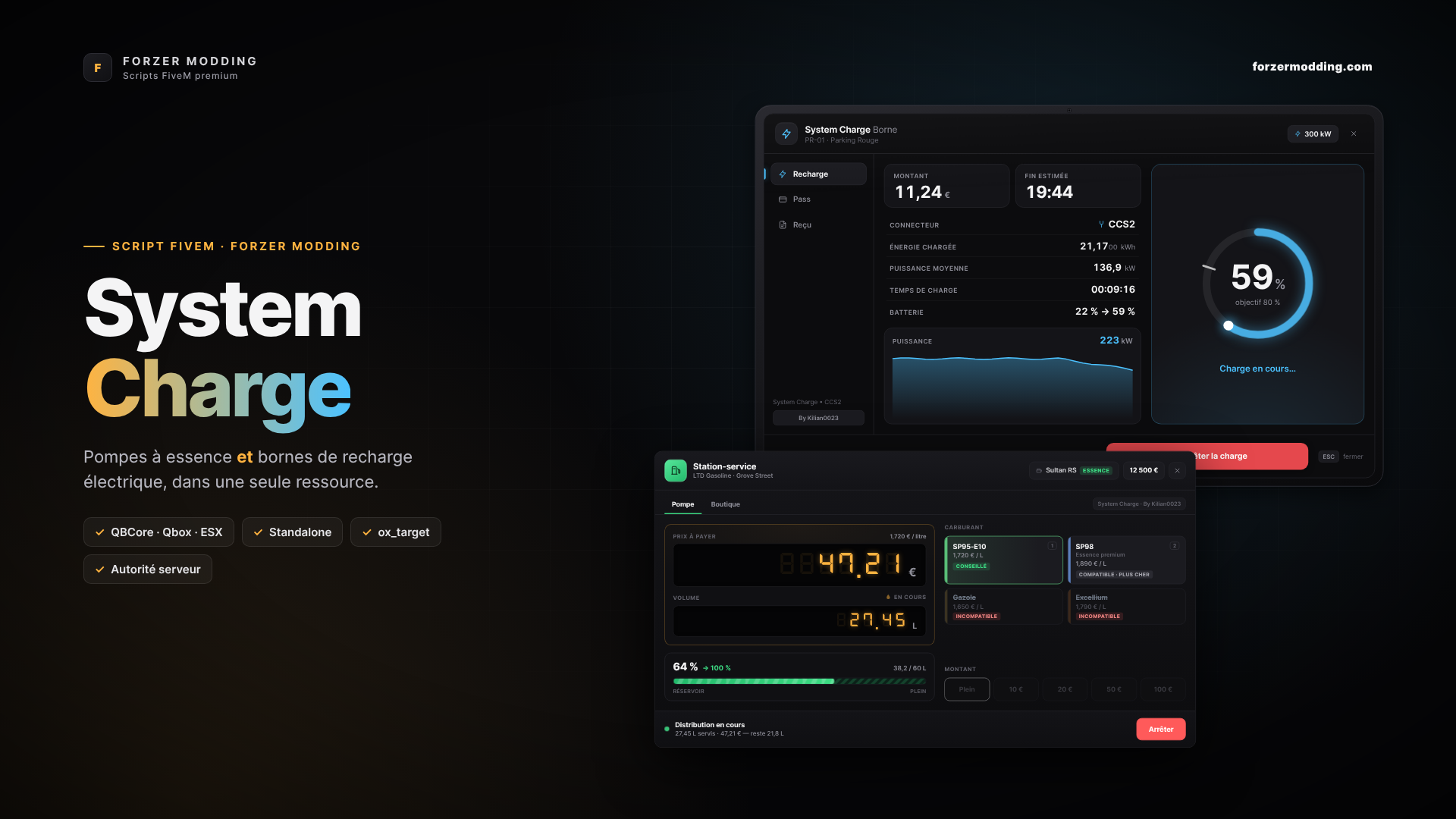
One single script for both types of station. Combustion vehicles refuel at the pump, electric vehicles recharge at the charging station, and each is refused at the other. Realistic, server-side secured and ready to use: the game's pumps are detected automatically and 9 charging car parks are delivered with their props.
✅ QBCore · Qbox · ESX · Standalone — no mandatory dependency.
━━━━━━━━━━━━━━━━━━━━
⛽ FUEL PUMP
- LED display like a real pump: the price and volume scroll continuously during refuelling.
- Full tank or fixed amount (10 / 20 / 50 / 100 €, configurable), stop at any time.
- 4 fuels: Diesel, Excellium (premium diesel), SP95-E10 and SP98, each with its own price per litre.
- The right fuel for the right engine: the recommended fuel is preselected, incompatible fuels are crossed out and refused. A diesel never takes petrol, and an electric vehicle is refused at the pump.
- Your addon vehicles are classified automatically thanks to their GTA class: no names to add. Exception lists are available if needed.
- A full tank is a full tank: the volume dispensed depends on the real tank capacity, adjustable per model.
- Engine off required, vehicle nearby, and refuelling stops if the player walks away.
- The game's pumps are already there: the 7 GTA pump models are detected automatically, and the 25 stations on the map are referenced with their blip. The pumps of your MLOs are added in one line.
🛢️ SHOP & JERRYCAN
- Buy jerrycans directly at the pump, with a choice of quantity.
- Refuel anywhere on the map, with a progress panel that does not block the player.
- Inventory detected automatically: ox_inventory, qb-inventory, qs-inventory, ps-inventory, core_inventory, codem-inventory, or the framework's inventory.
⚡ ELECTRIC CHARGING STATION
- Tablet with three tabs: Charge, Pass and Receipt.
- Charge limit from 50 to 100%: the energy, cost and end time are estimated before plugging in.
- Realistic charging curve: the power drops near the end of the charge, as on a real electric car.
- Price per kWh calculated according to the power of the station (from slow charger to supercharger), or set station by station.
- Real-time session: amount, energy, average power, live power curve, estimated end time.
- Plug & Charge or badge reading before each session.
- Charging continues with the menu closed and stops automatically at the chosen limit.
- Detailed receipt at the end of the session, showing the savings made thanks to the pass.
- Electric vehicles detected automatically, addons included (single-gear engine), with a manual list as a complement.
- 9 equipped car parks delivered with their props (supercharger and electrical cabinet). You can add as many car parks and stations as you want.
💳 MEMBERSHIP PASS
- Silver, Gold and Platinum Pass: discount per kWh, faster charging, or even free charging.
- Price, duration and benefits fully configurable, with a comparison table in the tablet.
- Database saving via oxmysql. Tables are created automatically on first startup.
🛡️ SECURITY
- The client never sends an amount: prices are read back server-side from the config.
- Fuel compatibility and charge limit rechecked server-side.
- Money is deducted progressively. Funds run out: the pump cuts off and the tank stays partially filled, as in real life.
🧩 COMPATIBILITY
- Frameworks: QBCore, Qbox, ESX (Legacy and older versions), Standalone. Automatic detection.
- Interaction: ox_target, qtarget, qb-target, bt-target, or the E key with GTA's native help.
- Fuel gauge synchronised: native gauge, LegacyFuel, ps-fuel, cdn-fuel, ox_fuel. Your HUD fills up both after refuelling and after charging.
- Notifications: ox_lib, otherwise the framework's, otherwise GTA's.
- Currency in euro, dollar or custom. Bank account or cash, as you choose.
⚙️ CONFIGURATION & INSTALLATION
- A single config.lua, fully commented in French, with a Charging Stations section and a Pumps section.
- Embedded fonts: the interface displays identically, even offline.
- Installation: place the folder in resources then add "ensure cfx_fmodding_systemcharge" to your server.cfg.
━━━━━━━━━━━━━━━━━━━━
Developed by Kilian0023 — Forzer Modding